5 Tips to Get the Most Out of QR Codes Turn Simple QR Codes into Powerful Tools for Business Growth

Today, QR Codes have become an essential part of everyday life. From making cashless payments and ordering food to connecting to Wi-Fi, registering for events, and accessing websites, QR Codes provide a fast and convenient way to bridge the gap between the physical and digital worlds.
What started as a simple method for storing website links has evolved into a powerful business tool. Companies of all sizes now use QR Codes to improve customer engagement, streamline operations, and enhance marketing campaigns.
Whether you own a restaurant, café, hotel, retail store, online business, school, or corporate company, using QR Codes effectively can help increase sales, improve customer experience, and save valuable time.
In this article, we'll explore five practical ways to maximize the benefits of QR Codes and show how you can apply them to your business today.
Why Are QR Codes So Popular?
QR Codes continue to grow in popularity because they are incredibly simple and efficient to use.
Their key advantages include:
Instant access with a smartphone camera
No additional app required on most modern devices
Eliminates typing errors
Saves time for both businesses and customers
Stores various types of information
Works in both online and offline marketing
Can be printed on virtually any marketing material
These benefits make QR Codes an essential part of modern digital marketing strategies.
1. Replace Traditional Business Cards
Paper business cards are still useful, but they often come with several disadvantages:
They can be easily lost.
Contact information may become outdated.
Customers must manually enter your information into their phones.
A Digital Business Card (vCard QR Code) solves all these problems.
When someone scans your QR Code, they can instantly save your contact information, including:
Full name
Job title
Company
Phone number
Email address
Website
LINE Official Account
Google Maps location
Ideal for:
Sales representatives
Real estate agents
Insurance advisors
Consultants
Freelancers
Public speakers
Business executives
A digital business card not only saves time but also creates a modern and professional first impression.
2. Drive More Visitors to Your Website or Landing Page
One of the most popular uses of QR Codes is directing customers to a website.
Instead of typing a long URL, customers simply scan the code and instantly access:
Your company website
Promotional campaigns
Landing pages
Product pages
Online stores
Registration forms
Event pages
Perfect for:
Flyers
Posters
Brochures
Product packaging
Catalogs
Business cards
Roll-up banners
Exhibition booths
Storefront displays
Benefits
Increase website traffic
Simplify customer access
Improve conversion rates
Generate more sales from offline marketing
The easier customers can reach your content, the more likely they are to take action.
3. Connect Customers to All Your Social Media Channels
Most businesses today maintain multiple social media platforms, such as:
TikTok
YouTube
X (formerly Twitter)
LINE Official Account
Printing every social media link on your marketing materials can make them look cluttered.
Instead, create a Social Media QR Code that directs users to one page containing all your social profiles.
Customers can choose which platforms they want to follow.
Benefits
Increase followers
Improve engagement
Boost video views
Strengthen your brand presence
Make it easier for customers to stay connected
This solution is ideal for influencers, content creators, online stores, and businesses of every size.
4. Share Wi-Fi Access Instantly
One of the most common questions customers ask in restaurants, cafés, hotels, and offices is:
"What's the Wi-Fi password?"
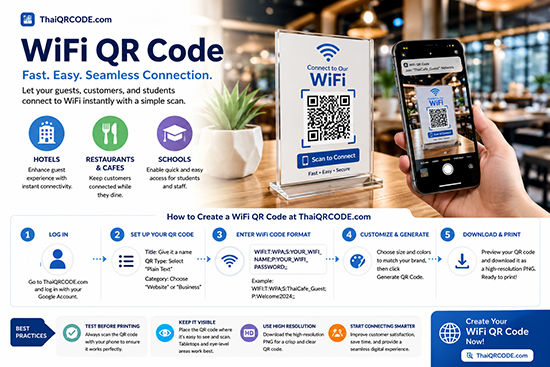
Instead of repeating the password countless times, you can create a Wi-Fi QR Code.
When customers scan it, their devices automatically connect to your wireless network without manually entering:
Network name (SSID)
Password
Perfect for:
Restaurants
Cafés
Hotels
Resorts
Schools
Universities
Offices
Meeting rooms
Co-working spaces
Clinics
Beauty salons
Providing easy Wi-Fi access improves customer satisfaction while reducing staff workload.
5. Boost Marketing Campaigns with QR Codes
QR Codes are one of the most affordable yet effective marketing tools available today.
They can be used for:
Discount coupons
Promotional offers
Customer loyalty programs
Product catalogs
Event registration
Customer surveys
Membership sign-ups
Menu downloads
Digital brochures
Exclusive content
Example
Imagine a coffee shop placing a QR Code on every takeaway cup.
When customers scan it, they can receive:
A discount coupon
A digital loyalty card
New product announcements
Seasonal promotions
Exclusive rewards
This simple strategy encourages repeat visits and builds long-term customer relationships.
Industries That Benefit from QR Codes
Restaurants
Digital menus
Food ordering
Customer reviews
Promotions
Wi-Fi access
Hotels
Wi-Fi login
Online check-in
Local travel guides
Room information
Google Reviews
Schools
Learning materials
Timetables
School websites
Announcements
Teacher contact information
Online Stores
Product pages
Secure payments
Social media
Customer support
Businesses
Digital business cards
Product catalogs
Downloadable documents
Job applications
Company profiles
Best Practices for Creating Effective QR Codes
Creating a QR Code is easy, but designing one that people actually scan requires some planning.
Follow these best practices:
Use high contrast between the QR Code and its background.
Download high-resolution files for printing.
Test every QR Code before publishing.
Leave sufficient white space (quiet zone) around the code.
Make the QR Code large enough to scan comfortably.
Place it where people can easily see and access it.
Include a clear call-to-action, such as:
"Scan to View Menu"
"Scan for 20% Off"
"Scan to Download Our Catalog"
These simple improvements can significantly increase scan rates.
Common QR Code Mistakes to Avoid
Many businesses create QR Codes but fail to achieve good results because of avoidable mistakes.
Common issues include:
QR Codes that are too small
Low color contrast
Busy or patterned backgrounds
No explanation of what the QR Code does
Broken or outdated destination links
Poor placement where customers cannot easily scan
Always test your QR Codes on multiple devices before using them in marketing campaigns.
Conclusion
QR Codes are far more than simple black-and-white squares—they are powerful tools that connect offline experiences with digital content. Whether you're sharing contact information, directing visitors to your website, providing instant Wi-Fi access, promoting your social media channels, or launching marketing campaigns, QR Codes help businesses deliver faster, smarter, and more engaging customer experiences.
By choosing the right type of QR Code and following best practices for design and placement, you can improve customer satisfaction, increase engagement, and create new business opportunities.
If you're looking for a professional QR Code generator, ThaiQRCODE.com makes it easy to create beautiful, high-resolution QR Codes that never expire. Generate QR Codes for websites, Wi-Fi, contact cards, phone numbers, email addresses, text messages, Google Maps, PDF documents, videos, and much more—all in just a few clicks.